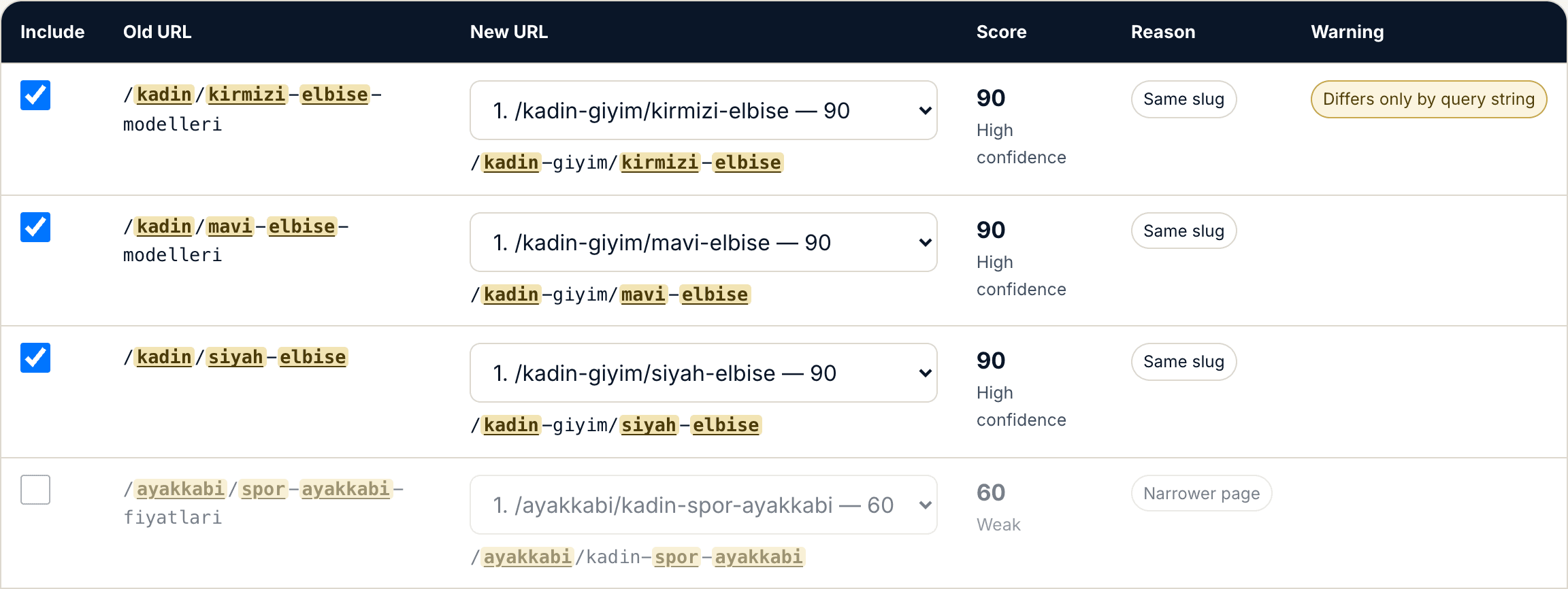
Upload your old and new URL lists. The tool finds the closest new URL for every old one, shows a similarity score and the reasoning behind it, and writes your Apache or nginx redirect file.
Use the tool
Your file is never uploaded — everything runs in your browser and your URL list never leaves your device.
20 old and 20 new URLs. Four of them already exist at the same address, so they need no redirect.
1. Download the template and fill it in
Two columns: old_url (the URLs returning 404) and new_url (the URLs that exist on the new site).
The two columns are independent lists — the values on one row are not paired with each other. The columns may have different lengths.
2. Upload the file
Drag your CSV file here
or
CSV files only. The delimiter is detected automatically: comma, semicolon or tab.
Settings
No candidate below this score is selected automatically.
This domain is put in front of every target in the output.
Questions about the redirect tool
How many rows can it handle?
Two thousand rows per list. Above that the tool refuses to start and tells you the count; it does not silently take the first 2,000, because a truncation you do not notice means migrating a site with an incomplete redirect map. Split larger lists into parts: matching compares every old URL against every new URL, so splitting does not change the result as long as you supply the complete new URL list with each part.
Is my file uploaded to a server?
No. Everything runs in your browser and your URL list never leaves your device. The details are in the guide, under “Where does your data go?”.
Can I upload an Excel file?
There is no direct .xlsx upload. In Excel choose "Save As → CSV"; the tool detects the delimiter automatically, including the semicolon that Turkish Excel writes. You can also copy the two columns into the boxes on the Paste tab.
Do the two columns in the template correspond to each other?
No, and this is the most common mistake. The two columns are independent lists: old_url holds the URLs to redirect, new_url holds the target pool. The two values on one row are not paired. The columns may have different lengths — 40 old and 900 new URLs is entirely normal.
From what score can I trust a match?
90 and above is high confidence and can be bulk-approved. 70–89 needs review, and the default view drops you straight into it. 50–69 counts as weak and is not selected automatically. Below 50 is treated as no match; a parent-category suggestion is shown when one exists, but never selected.
Should I redirect unmatched URLs to the home page?
No. Google treats a redirect to an irrelevant target as a soft 404 and passes none of the old page’s value. Either redirect to a genuinely related parent category or leave a 404/410. A 404 is an honest signal; a wrong 301 is not.
Do URLs with Turkish characters match correctly?
Yes. Turkish letters are folded to ASCII through an explicit mapping table before lowercasing — the order matters, because a standard lowercase turns the dotted capital İ into an invisible artefact that silently breaks matching. Percent encoding is decoded before tokenization too, so /%C3%BCr%C3%BCn and /ürün give the same result. The interface and every export always show your original URL.
What happens to query strings?
By default they are ignored in the comparison; you can include them in the settings. Two old URLs that differ only by parameter are not merged: they stay as separate rows carrying a "differs only by query string" warning, because a path-based server rule cannot tell them apart and you need to know that.
I am changing domain — what does the output look like?
If the tool sees different domains in the two lists it tells you and switches the output to absolute URLs automatically; written as relative paths the targets would point back at the old domain. You can change the target domain in the settings.
What do the chain and loop warnings mean?
A chain means the target is also in your old list: this redirect lands on another redirect. A loop is A → B together with B → A, which produces an infinite redirect. Both must be fixed before deploying — a chain leaks value at every hop, and a loop makes the page completely unreachable.
How it works
How does redirect mapping actually work?
Sungur Kerem Gezergün · Last updated:
How is the similarity score calculated?
The score is a single number between 0 and 100: the weighted sum of four components. Most tools do not explain how their score is calculated. It is written out in full here, because deciding which rows to trust requires seeing the reasoning, not just the number.
The four components of the score, their weights and what they measure
Component
Weight
What it measures
Weighted word overlap
50%
How many meaningful words the two URLs share. Words are not weighted equally.
Character-level similarity
25%
Spelling differences, different endings, reordered words. Measured on character trigrams.
Path structure
15%
Closeness in the category tree: do the two URLs sit under the same directories?
Depth and length
10%
Pages at the same level are closer to each other.
Word weights are computed from your new URL list. The more often a word appears in it, the less it says: matching on "dress" when 300 URLs contain it is far less informative than matching on "crimson" when 12 do. On top of that, the filler words that carry no meaning in an e-commerce URL — models, types, prices, discounted, buy, product, page, category — are given a low weight.
These words are down-weighted, never deleted. If they were deleted, /dress-prices and /dress-models would look identical and the tool would report a fake 100% match.
Overlap is calculated so that the unmatched words on both sides cost something. This is not a refinement, it is a requirement: /dress is entirely contained inside /crimson-dress-models, so a measure that only asks "are the candidate’s words present in the source?" awards it 100% and short generic URLs win every time. This tool also counts the words the candidate is missing, and never uses a substring check anywhere in its scoring.
A specificity rule sits on top of that. After the filler words are set aside, the remaining meaningful word sets are compared: if the candidate is a subset of the source — a more general page — its score is capped at 65 and it is labelled "broader page"; if the source is a subset of the candidate, the cap is 60. A cap does not remove a candidate, it only stops it being auto-approved and stops it outranking a candidate of equal specificity.
A worked example: the source URL is /crimson-dress-models; its meaningful words are crimson and dress ("models" is filler).
Two candidates for /crimson-dress-models, assessed step by step
Candidate
Assessment
Score
/crimson-dress
Same meaningful word set as the source, so no cap; the last segment carries the same meaningful words too, which brings in the 90 floor
90
/dress
A subset of the source, so capped at 65; "dress" is also a common word with a low weight
56
Three shortcuts sit above this calculation. If the normalized paths are identical the score is 100. If both URLs carry the same product id or SKU the score is at least 95, and that floor overrides the specificity cap — an id is evidence of the same product. If the last segment carries the same meaningful words but the directory differs the score is at least 90; this floor does not override the cap, because between /women/dress and /dress the last segment matches while the candidate is still the more general page. That last floor has a condition: the slug has to be distinctive, meaning at least two meaningful words, or one word that is rare in the list. Otherwise /women/dress and /men/dress share their last segment and a women’s-to-men’s redirect would score 90.
Clearing the filler words before the coverage test is what makes this result possible. Without it /crimson-dress would also count as a subset of the source — it is missing the word "models" — and the correct answer would be capped at 65 as well.
The coverage test has one subtlety. When two URLs sit at the same depth the test runs on the last segment alone, not the whole path. The reason is the most common migration there is: /women/crimson-dress-models becoming /womenswear/crimson-dress. Looking at the whole path, the extra word "womenswear" makes the source a subset of the candidate and caps the obviously correct answer at 60. Directories are structure; the last segment is what identifies the page, and it is where a real change in specificity shows up.
Comparison always runs on a normalized form: the protocol and domain come off, the trailing slash goes, percent encoding is decoded, extensions like .html and .php are ignored, the fragment and query string are dropped, and Turkish characters are folded to ASCII for comparison only. Every export writes the original URL you supplied — a server rule has to match the real address, not the folded one.
A redirect checklist for a site migration
Crawl the old site completely before the migration and export every URL that returns 200. Producing this list after the migration is far harder.
Add the URLs that received clicks in the last 16 months from Search Console, plus your organic landing pages from analytics. There are always pages a crawler misses that still get traffic.
Pull the URLs that have external links from your backlink tool. These are the most critical to redirect; each one lost is link equity lost.
Get the live URL list for the new site. If you are matching against staging, make sure those addresses will not change when it goes live.
Match with this tool, bulk-approve everything above 90, and review the 50–89 band one row at a time. Spend your time here; the real work is in that band.
Clear the chain and loop warnings. A redirect chain leaks value at every hop, and Google stops following at some point along it.
If more than 20 old URLs point at one target, reconsider that target. It usually signals a section with no equivalent on the new site rather than a matching problem.
Deploy the rules as 301, not 302. On a permanent move a 302 signals Google to keep the old URL as canonical.
After going live, crawl the old URL list again: every one should reach a page returning 200 through a single 301.
Submit the new sitemap in Search Console and keep the old sitemap live for at least a few months. Google cannot see your redirects until it recrawls the old URLs.
Do not remove the redirects for at least a year. Google keeps crawling old URLs for months, and external links are never updated.
Setting the rules up on your server
The Apache output uses RedirectMatch rather than Redirect, with the pattern anchored at both ends. The reason is that Redirect matches by prefix: a rule written for /dress also catches /dress-blue and everything beneath it. Put the rules at the top of your .htaccess file, ahead of your other redirects.
Verify the syntax after uploading: apachectl configtest. If it errors, roll the file back — a broken .htaccess returns 500 for the whole site.
The nginx output is a map block, because that is how you express two thousand rules. The map goes in the http context and the condition in the server block. The key is $uri, not $request_uri: $uri is the decoded path without the query string, which is exactly what the rules match.
Check it with nginx -t, then reload with nginx -s reload. A full restart is not needed.
On WordPress, pick the Redirection plugin format and load it from Tools → Import. Above a thousand rules prefer a server rule over the plugin: running PHP on every request is needless overhead.
If you sit behind Cloudflare or a similar CDN, purge the cache after deploying. If the old 404 responses are still cached, your new rules are invisible.
Common mistakes
Bulk-redirecting everything unmatched to the home page. Google treats a redirect to an irrelevant target as a soft 404 and passes none of the old page’s value. A wrong redirect is worse than no redirect: a 404 is an honest signal, a wrong 301 is not.
Ignoring chains. In A → B → C every hop leaks value, and Google stops following after about five. Always redirect straight to the final destination.
Using Redirect instead of RedirectMatch on Apache. Because it matches by prefix, a rule for /product also catches /product-detail, /product/123 and hundreds of other addresses — and it takes weeks to notice.
Using 302 instead of 301. A temporary signal keeps the old URL in the index and does not pass link equity.
Overlooking query strings. /products?category=dress and /products?category=bag differ only by parameter, and a path-based rule cannot tell them apart. This tool keeps such rows separate and warns about them.
Leaving a mix of www and protocol variants. Redirect targets must resolve to one canonical form, or every request takes two hops.
Not testing URLs with non-ASCII characters in their encoded form. The browser shows /ürün while the server receives /%C3%BCr%C3%BCn. Verify your rule with a real request.
Deploying the rules and never verifying them. Writing the rules is half the job; recrawling the old URL list and seeing every one reach a 200 in a single hop is the other half.
Nowhere. Reading the file, normalizing, matching and writing the output all happen in your browser, inside a Web Worker. Keep the network tab open while matching runs and you will not see a single request.
That is a practical choice as much as a privacy one: a client’s URL list is confidential information at most agencies and does not need to be uploaded to a web tool. Only your settings — threshold, output format, weights — are remembered in your browser’s local storage. Your data is not: closing the page takes your list and your results with it, which is why you should download the output before you leave.